If this is your first visit, be sure to
check out the FAQ by clicking the
link above. You may have to register
before you can post: click the register link above to proceed. To start viewing messages,
select the forum that you want to visit from the selection below.
Can you help answer my question on a previous page about transferring programs (namely Office) from an old laptop to a new one w/o reregistering? Is it possible, if so how do I do it?
If I can figure it out, I'm sure there's plenty of head to be had from the ladyfriend - you can live vicariously through this
Thanks!
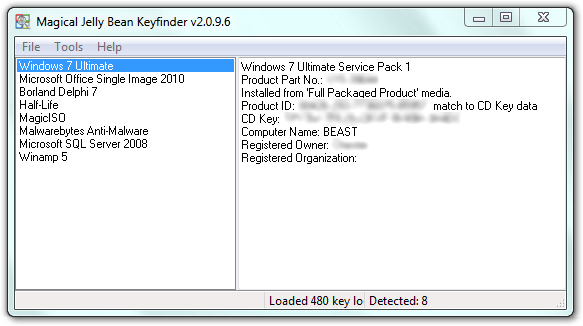
Do you have the programs on CD with license codes? If not, you can use THIS program to find your key for Microsoft products. You will need an installer CD for what ever program you are trying to install. If you only have the restore CD that came with your system, you will not be able to pull individual installers off of that.
No. She got the laptop as a 'hand me down' from her Dad a few years back. Looks like I'll need to make a run and pick it up. But thanks for the info!
Anyone know/recommend of any good sites/stores w/ cheap Office suite packaged software?
The measure of who we are is what we do with what we have.
Vince Lombardi
"Not really interested in being a spoiler or an underdog. We're the Green Bay Packers." McCarthy.
Can you help answer my question on a previous page about transferring programs (namely Office) from an old laptop to a new one w/o reregistering? Is it possible, if so how do I do it?
If I can figure it out, I'm sure there's plenty of head to be had from the ladyfriend - you can live vicariously through this
Thanks!
Do you have the programs on CD with license codes? If not, you can use THIS program to find your key for Microsoft products. You will need an installer CD for what ever program you are trying to install. If you only have the restore CD that came with your system, you will not be able to pull individual installers off of that.
Sorry. Its Friday and my brain is shutting down for the weekend.
Other than that, I really don't think its anything to rush out and spend the cash on. It'll come on your next computer, so get it then and no earlier.
I build my own, so it won't be coming on anything that I buy. What you've outlined is an incredibly weak value propostion, and MS is in a lot of trouble if they're counting on people to upgrade to Vista. I suppose they'll make loads of money bundling the license into consumer PC purchases, but those might slow down a bit too as applications are not obsoleting systems quite as fast as they used to.
I've heard the Vista version of MCE is a complete mess so far, and for all your trouble you get big brother DRM to boot.
Can you help answer my question on a previous page about transferring programs (namely Office) from an old laptop to a new one w/o reregistering? Is it possible, if so how do I do it?
If I can figure it out, I'm sure there's plenty of head to be had from the ladyfriend - you can live vicariously through this
Thanks!
Do you have the programs on CD with license codes? If not, you can use THIS program to find your key for Microsoft products. You will need an installer CD for what ever program you are trying to install. If you only have the restore CD that came with your system, you will not be able to pull individual installers off of that.
No. She got the laptop as a 'hand me down' from her Dad a few years back. Looks like I'll need to make a run and pick it up. But thanks for the info!
Anyone know/recommend of any good sites/stores w/ cheap Office suite packaged software?
I recently built a new PC and used this program to transfer all my files including Office. Worked pretty well. I bought it new for about $80 (still cheaper than Office) but I have seen it on Amazon for about $20-30? Make sure it comes with the USB cable or it ain't much good.
Can you help answer my question on a previous page about transferring programs (namely Office) from an old laptop to a new one w/o reregistering? Is it possible, if so how do I do it?
If I can figure it out, I'm sure there's plenty of head to be had from the ladyfriend - you can live vicariously through this
Thanks!
Do you have the programs on CD with license codes? If not, you can use THIS program to find your key for Microsoft products. You will need an installer CD for what ever program you are trying to install. If you only have the restore CD that came with your system, you will not be able to pull individual installers off of that.
No. She got the laptop as a 'hand me down' from her Dad a few years back. Looks like I'll need to make a run and pick it up. But thanks for the info!
Anyone know/recommend of any good sites/stores w/ cheap Office suite packaged software?
I recently built a new PC and used this program to transfer all my files including Office. Worked pretty well. I bought it new for about $80 (still cheaper than Office) but I have seen it on Amazon for about $20-30? Make sure it comes with the USB cable or it ain't much good.
Thanks! I'll give it a shot.
The measure of who we are is what we do with what we have.
Vince Lombardi
"Not really interested in being a spoiler or an underdog. We're the Green Bay Packers." McCarthy.
Your welcome. You may want to do with Zool suggested and use the program he had a link to get the CD key.
Also, Scott is right, OpenOffice works very well (and runs in Linux!) and you can save to Office formats!!! That is certainly the cheapest alternative.
Other than that, I really don't think its anything to rush out and spend the cash on. It'll come on your next computer, so get it then and no earlier.
I build my own, so it won't be coming on anything that I buy. What you've outlined is an incredibly weak value propostion, and MS is in a lot of trouble if they're counting on people to upgrade to Vista. I suppose they'll make loads of money bundling the license into consumer PC purchases, but those might slow down a bit too as applications are not obsoleting systems quite as fast as they used to.
I've heard the Vista version of MCE is a complete mess so far, and for all your trouble you get big brother DRM to boot.
I haven't really followed Vista too much, so its very possible I am missing many features. I know the big things are a seperate administrator account from your personal account to nullify many of the security threats that exist today. In addition to that, the big feature was WinFS. That has been scrapped. I'll do some research over the weekend and look into it more. I too build my own computers, and I will probably get it since I believe i'll get it for free being in the SE/EE program. I would find a student if you could and have them purchase it for you at the 50 dollar price instead of several hundred dollars.
Are laptop video cards easy to upgrade? I currently have a 128MB but would like a 256MB card. I had this laptop customized by HP and that is one thing that I wish I would have got. However, at the time it would have pushed the delivery back 2 weeks. Of course, my impatience won that battle.
I've done several hardware upgrades on towers, but never anything with laptops. Any advice?
Some newer high performance laptops have upgradeable video cards.
Date: September 28th, 2005
The G70 and the XPS M170 Debut
Today, Dell has introduced the next version of their high performance XPS notebook series. The new XPS M170 is similar to the previous model with a few key upgrades. In keeping with their exemplary track record, NVIDIA has announced the GeForce Go 7800 GTX in coordination with the first product launch containing their part. The $349 upgrade to the Go 6800 Ultra can be added to any XPS M170 purchase. Paired with the Pentium M 780, this machine will be an absolute mobile monster.
 Tweet
Tweet




Comment